
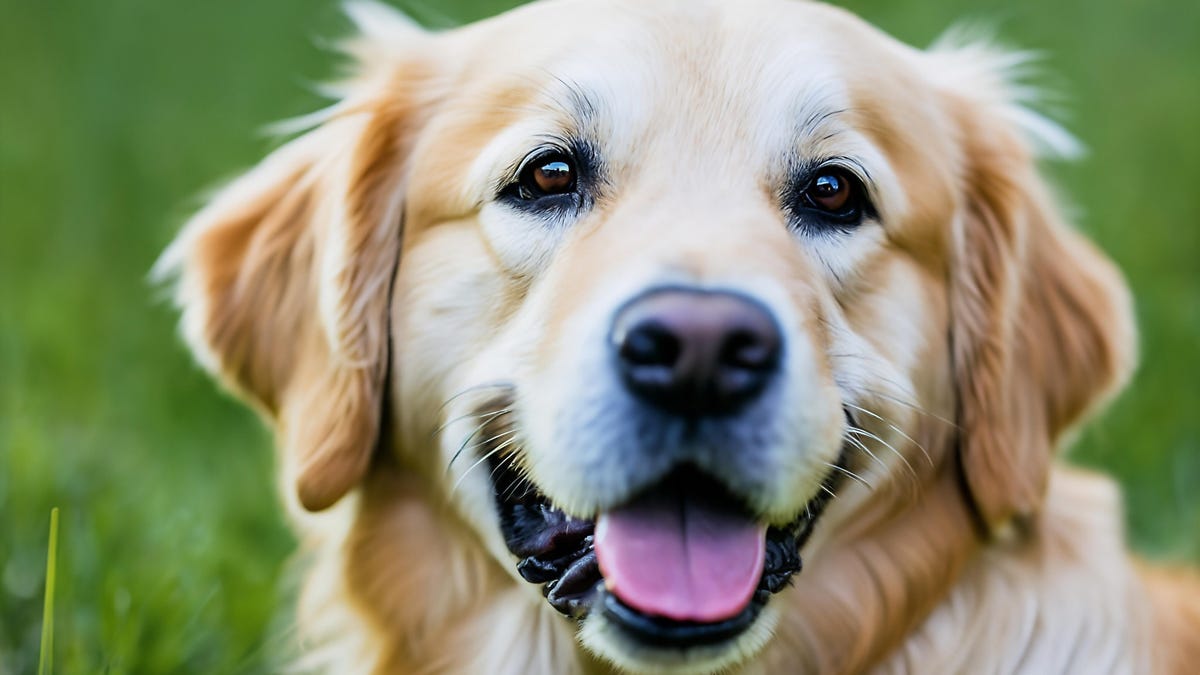
Prompt: hyper-realistic golden retriever smiling while cinematically staring off to the side at light
Sabrina Ortiz/ZDNET via Generative AI by Getty ImagesIf your work involves sourcing and inserting images into projects — whether it’s for articles, social media campaigns, or presentations — you know how challenging it can be to find an image that fits your and your organization’s needs and vision. That’s where AI text-to-image generators can come in handy. However, the risk of copyright infringement can open another can of worms, especially for businesses that can’t afford the risk of a lawsuit.
Also: The US Copyright Office’s new ruling on AI art is here – and it could change everything
To address this issue, Getty Images launched Generative AI by Getty Images, an image generator that leverages Getty’s robust library of stock images to create new images from text prompts. These AI-generated images have Getty Images’ standard royalty-free license, assuring customers that their content is fair to use without risk of legal repercussions.
Getty is so confident about the model’s safety that it even includes legal protections and indemnification starting at $50,000 per generated image. Although safety is an important aspect of image generation, if the images generated aren’t of good quality, then of what value is the legal protection perk? I put Getty’s AI-generated imagery to the test — and I was pleasantly surprised.
Using it Getty Images designed its image-generating interface to be intuitive, making it super easy to get started even if you have never used an AI image generator before. Getty also includes buttons and features that make crafting the perfect prompt and getting the ideal results easy.
Screenshot by Sabrina Ortiz/ZDNETWhen you visit the AI Generator interface, you are directed to insert a prompt with the instruction, “Describe the image you want to generate.” Then you can type in your prompt describing what you want to see, and in the “Exclude” field, enter what you don’t want to see.
If even that seems a bit too daunting, as blank page syndrome is a real thing, Getty Images also includes a prompt builder in the upper right-hand corner, which presents you with fields where you can input text to craft the perfect prompt. The fields say, “Main subject,” “action,” “surroundings,” and “visual aesthetics,” to make sure users address all the points.
Screenshot by Sabrina Ortiz/ZDNETOnce you are done crafting your prompt using either method, you can click on the buttons on the right-hand tab to finish personalizing. This includes selecting from content type (photos or illustrations), aspect ratios, camera controls, including lens type (wide angle or telephoto), and depth of field (shallow or deep), and color and mood.
Also: 5 ways AI can help with your taxes – and 10 major mistakes to avoid
You also have the option of inserting a reference image or a product image that can be incorporated into the new generation. This is especially helpful for incorporating brand assets into the new images, such as placing your product behind different backgrounds.
QualityOnce you enter all the prompts, generating your four images takes seconds. Now for the moment of truth — the quality.
To ensure I had a robust amount of images to judge, I generated anything from animals to people and can say, for the most part, I was impressed. I include two generations below: one of people and a close-up of a ladybug.
Sabrina Ortiz/ZDNET via Generative AI by Getty ImagesAs you can see, the generator is capable of photorealistic images. However, a pattern I did notice was that, to generate shots of people, it took several tries and prompt tweaking to ensure that the anatomy of the people was correct and gave realistic, usable results like the one above.
Also: How to use Microsoft Image Creator to generate and edit stunning AI images for free
Upon first try, the people in the photos often had proportions off, extra limbs or body parts not specified in the prompt, blurred-out elements such as teeth, noses, or eyes, or a glazed stare that made it evident that they were AI-generated, as seen below.
Sabrina Ortiz/ZDNET via Generative AI by Getty ImagesAfter trying several times, images like the one I first included are possible, but depending on your plan and image-generating limit, that may not be feasible for many businesses. Having said that, if you are a professional who is more concerned with generating animals, objects, and abstract concepts, which newsrooms and marketers often rely on for visuals, the model was incredibly impressive.
In nearly every attempt I made at generating an image of a non-human subject, the photos looked like they could have come out of the Getty Images library, with the competitive edge of being tailored to your needs and original. The best part is the peace of mind that the images were generated using a model that is commercially safe.
Post-editOne of the biggest standouts of the platform is its post-image-generating edits. You can hover your mouse over a generated image to see a “Modify” option, which, when clicked, will give you the option to “Refine” (outpaint and inpaint), “Extend,” and “Remove background.”
Also: Is DeepSeek’s new image model another win for cheaper AI?
To refine an image, all you have to do is brush over any part of the image and replace or remove selected elements. This is especially helpful for brands to maintain brand consistency, as they could use the same subject across multiple backgrounds or vice versa.
SafetyAs mentioned above, the model’s biggest advantage is being commercially safe. Getty Images reassures users that the dataset used to train the model is “not polluted by web-scraped or public domain data.” Rather, the Getty Images content creators whose work was used in the training set are compensated.
Users will also have the peace of mind that, because the images were not trained on the web, no matter how close they get to describing an existing concept or product, a trademarked logo or character will never be included accidentally.
Availability If you want to get started you can visit the Getty Images website, where you can select from the introductory pricing of $49 for 25 generations or $149 for 100 generations. If you need a custom enterprise plan, you can contact sales.
Artificial Intelligence